Quickstart without an account
Find the agents in your repository, watch every call your app makes, and read what AgentFox found. Nothing leaves your machine. You need Python 3.11 or newer.
Scan the repository
bash pip install agentfox agentfox scanscanreads your code without running it. It names each agent, the tools it can reach, and any agent that reads private data, reads untrusted content and can send data out.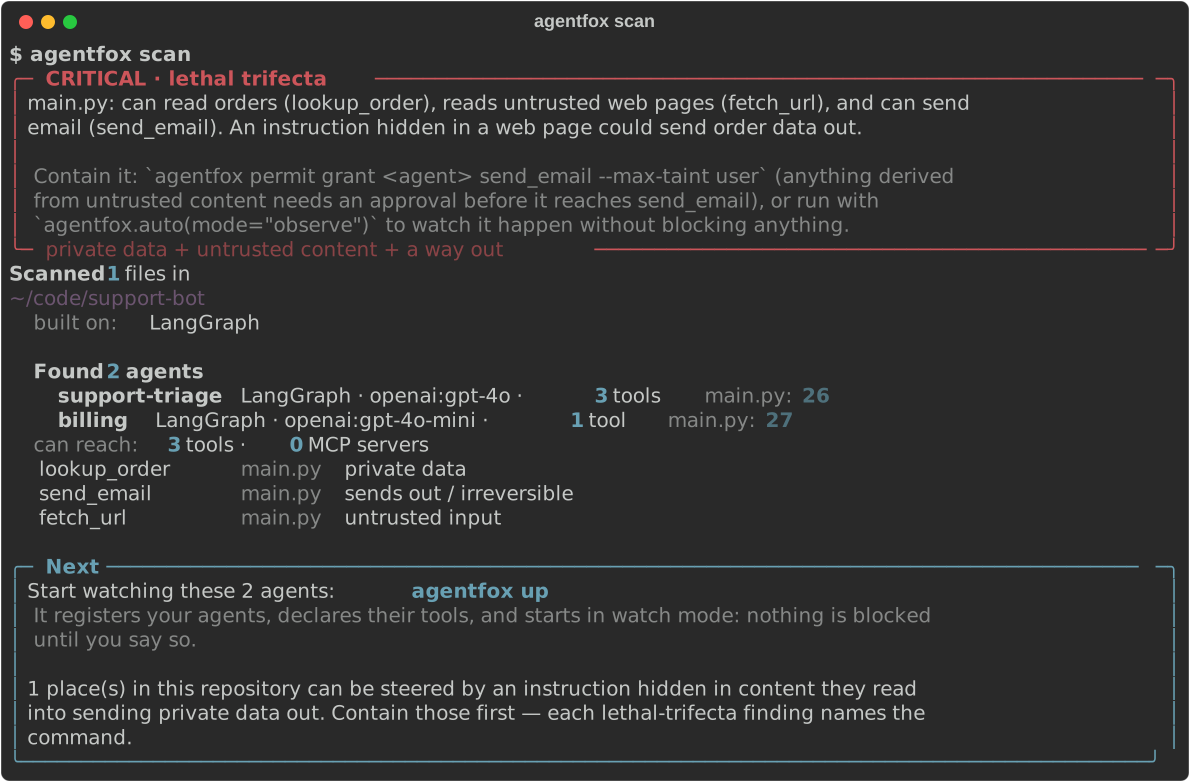
Set up
bash agentfox upEvery question has a recommended answer; press Enter to take it.
upregisters your agents under the names your code uses and addsagentfox.auto("<agent>")to the file that starts one: a script inpyproject.toml, the graphlanggraph.jsonloads, or the file that runs it (Runner.run,crew.kickoff(),graph.invoke()), undersrc/too. It starts in watch mode, so nothing is blocked yet.In a Python agent's repository it changes nothing else by default: no coding-agent hooks, no GitHub workflow, no background processes. Add them with
--with coding-agents,--with cior--with view.Run your app
Run it as you always do. Each model and tool call is checked and recorded in a database on this machine. When the app exits, it prints how many calls it checked.
Read what it found
bash agentfox findingsEach row is something a person should look at. "Would have been" means a rule caught it and watch mode let it through.
Attack-test it
bash agentfox test redteam <agent>Runs the attack probes against the agent's configuration: prompt injection, data exfiltration, destructive actions.
upprints the command with your agent's name filled in.
Connect to an account later
Sign up, press Create a key on the Agents page, and run the init command from the card in the same repository. It saves the key in .agentfox/agentfox.env, and from then on your app's calls go to your account and show up on the dashboard. The Quickstart walks through it. To set the key another way, see where auto() finds the key.
If something goes wrong
| You see | Do this |
|---|---|
| The scan finds no agent | Run it in the repository where the agent is defined. It reads Python, TypeScript and JavaScript. |
agentfox findings is empty | Check that your app starts with agentfox.auto() and that you ran it from the folder where you ran up. |