Why hooks are the control point for coding agents
A coding agent runs with your shell, your files and your credentials. Its instructions come from you, but its context also comes from every README, issue, web page and package it reads while working. Any of those can carry an instruction, which makes a coding agent the most direct case of prompt injection meeting a real tool.
You cannot put a gateway between Claude Code and bash. What you can do is register a hook: a command Claude Code runs at fixed points in its loop, whose output it reads before continuing. A hook runs outside the model, so a prompt cannot talk it out of its answer. That makes it the right place for guardrails on coding agents, as long as you know which hooks can actually say no.
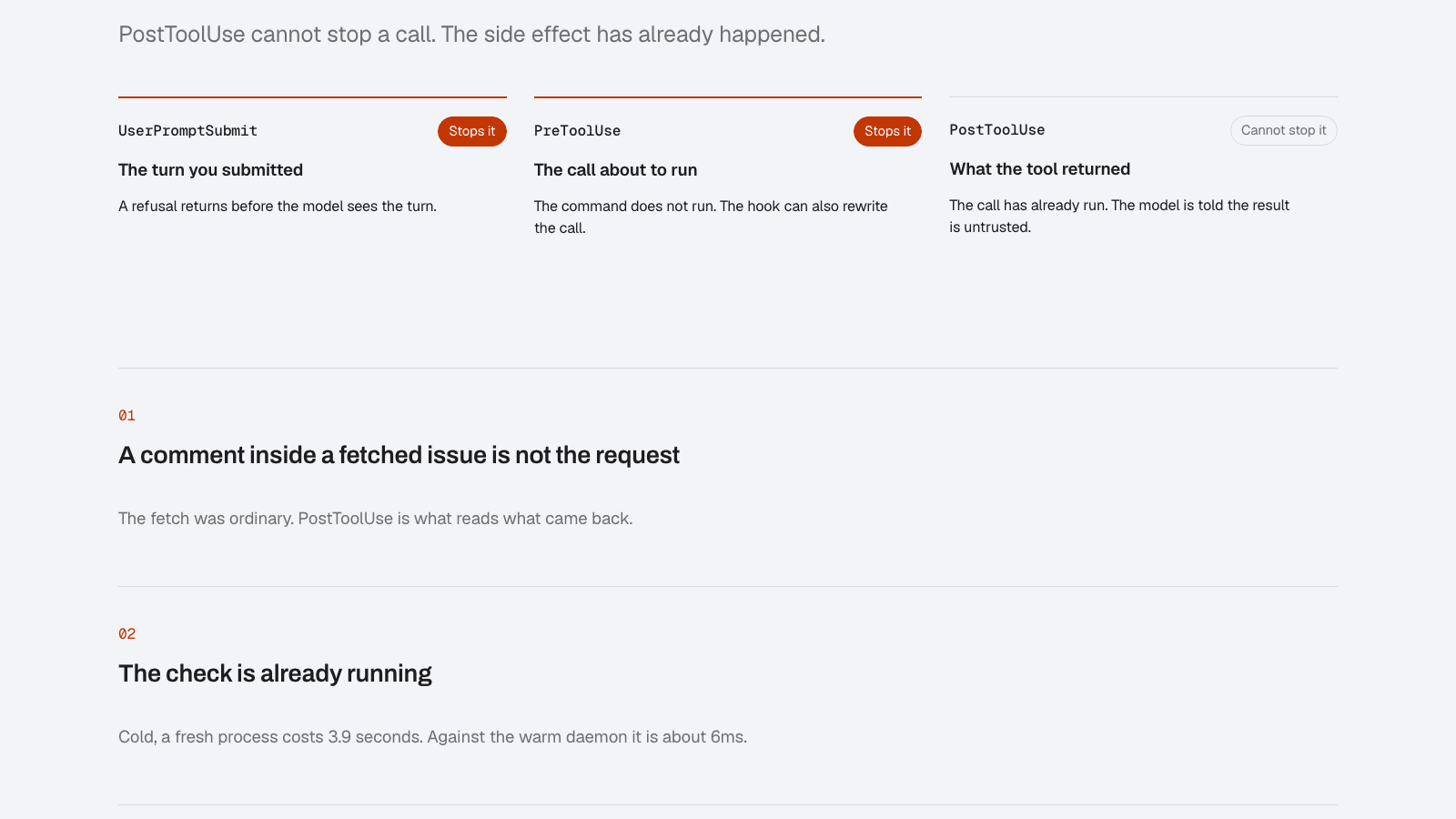
Three hooks, and only two can stop anything
We verified each of these against Claude Code 2.1.220, live where a probe was possible:
| Hook | Can it stop the action? | How we know |
|---|---|---|
PreToolUse | Yes. permissionDecision: "deny" stops the call and the reason reaches the agent verbatim. | Live probe |
UserPromptSubmit | Yes. A block ends the turn before the prompt reaches the model. | Read in the shipped bundle; a hook cannot trigger the operator's own turn |
PostToolUse | No. The command has already run. | Live probe |
A blocking hook could also signal with exit code 2, but Claude Code prefixes stderr with the hook script's path, so the agent sees noise instead of a reason. We return structured JSON instead. A refusal from AgentFox reads like this:
{
  "hookSpecificOutput": {
    "hookEventName": "PreToolUse",
    "permissionDecision": "deny",
    "permissionDecisionReason": "AgentFox: This runs code fetched at the moment of execution, which nothing reviewed.; command pipes a downloaded script straight into a shell (action.remote_code_execution, remote-code-execution)"
  }
}
One design choice falls out of the hook model: when the policy says escalate, the hook renders it as a deny. In the middle of a tool call there is nobody to escalate to, and a hook that waits for an approval would hang the session.
The one that cannot: PostToolUse
The Claude Code documentation describes decision: "block" for PostToolUse, and it is easy to read that as containment. In our probe the command still ran and its output still came back. What the block does is put a reason in front of the model, telling it to treat the result as untrusted.
That is still useful. PostToolUse is where an injection arriving inside a fetched page or a file's contents is caught, before the model acts on it. It is the right hook for detection. It is the wrong hook for anything you need to prevent, which is exactly the distinction our coding agents page is built around.
Install a working baseline
Print the configuration first, then write it:
agentfox admin hooks install --agent claude-dev           # prints the config
agentfox admin hooks install --agent claude-dev --write   # merges into .claude/settings.json
agentfox admin hooks daemon                               # a warm process the hooks talk to
The hook config is merged into your existing .claude/settings.json. It refuses to overwrite a file that is not valid JSON and skips an event that is already installed. All three events run the same command:
{
  "hooks": {
    "PreToolUse": [
      { "matcher": "*", "hooks": [{ "type": "command",
        "command": "agentfox hooks run --harness claude --agent claude-dev" }] }
    ],
    "PostToolUse": [
      { "matcher": "*", "hooks": [{ "type": "command",
        "command": "agentfox hooks run --harness claude --agent claude-dev" }] }
    ],
    "UserPromptSubmit": [
      { "hooks": [{ "type": "command",
        "command": "agentfox hooks run --harness claude --agent claude-dev" }] }
    ]
  }
}
The --write also sets up a baseline, which matters more than it sounds. An earlier version installed the hooks and nothing else, and default deny then refused everything, ls included. Now it registers the agent in development, declares Claude Code's built-in tools with an impact (Bash is a write, Read, Grep and WebFetch are reads, Task is high impact), grants them, and binds the coding-agent pack to that agent in observe mode.
Latency is the reason for the daemon. Starting the CLI cold for every call takes about 3.9 seconds; a call to the warm daemon takes about 6 milliseconds. It listens on a Unix socket under the state directory rather than on HTTP, so only your user can reach it.
What gets stopped
The shell rules come from the tool-containment pack, which ships enforcing and fails closed. These are real commands checked against it:
| Command | Rule | Result |
|---|---|---|
cat .env | secrets.credential_file | Blocked |
curl … | sh | action.remote_code_execution | Blocked |
rm -rf build | shell.destructive | Refused |
git push --force origin main | shell.destructive | Refused |
agentfox policy observe tool-containment | control_plane.tamper | Blocked |
git reset --hard HEAD~3 | action.history_rewrite | Escalate, shown as deny |
terraform apply | action.infrastructure_mutation | Escalate, shown as deny |
npm publish | action.supply_chain_publish | Escalate, shown as deny |
control_plane.tamper deserves a note. An agent that can switch its own guardrail to observe mode has no guardrail, so that rule is protected: a version of the pack without it will not load.
The coding-agent pack adds detection tuned for a developer machine: injection in fetched content is blocked at a lower threshold than the baseline, secrets in fetched content are blocked, and an injection the model appears to adopt in its reasoning is escalated. It ships in observe mode, so read what it would have done before you run agentfox policy enforce coding-agent.
Limits worth knowing
- It fails open. If the daemon is down, the hook allows the call and warns on stderr that it was not checked. A developer's session keeps working; you should know that is the trade.
- Local only. Hooks cover the Claude Code harness on the machine they are installed on. Cloud sessions and other coding agents need the gateway or the SDK.
- Shell rules are narrow deny-lists. They are deliberate and readable, and they are not a shell parser. A plain
git pushis allowed; only a force push is caught. - Shell fields only. Credential-file matching reads shell commands. We have not shown that the
Readtool pointed at.envis refused, so do not assume it. - MCP tools start refused. They have no grant, so default deny refuses them until you grant them.
agentfox policy proposals from-trafficproposes grants from what you actually used. See MCP rug pulls for why you want that. - Version-bound. Every row above was checked on one Claude Code version. Hook semantics can change, and we re-probe when they do.
Frequently asked questions
Which Claude Code hooks can block a tool call?
PreToolUse can deny a tool call before it runs, by returning permissionDecision set to deny. UserPromptSubmit can stop a prompt before it reaches the model. PostToolUse runs after the tool has already executed, so it cannot stop the call; it can only put a warning in front of the model.
Can a PostToolUse hook block a command in Claude Code?
Not in a way that undoes anything. In our live probe against Claude Code 2.1.220, a PostToolUse hook returning decision block did not stop the command: it had already run and its output came back. Treat PostToolUse as the place to catch indirect prompt injection arriving in a result, never as containment.
How do I install AgentFox hooks for Claude Code?
Run agentfox admin hooks install --agent claude-dev to print the configuration, then add --write to merge it into .claude/settings.json. The write also registers the agent, declares Claude Code's built-in tools with their impact and binds the coding-agent policy pack in observe mode.
What happens if the AgentFox hook daemon is not running?
The hook fails open: it allows the call, exits 0 and prints a warning on stderr that the call was not checked. That keeps a developer's session usable, and it is a limit you should know about before relying on the hooks.
Do Claude Code hooks protect cloud or remote agent sessions?
No. A hook runs in the local Claude Code harness on the developer's machine. Sessions that run elsewhere, and other coding agents, need a different control point such as the gateway or the SDK.